
Download ohphoneX – Free Phone Call App, AI Call Transcription, Voicemail, Call Recording, Desktop Phone Software, Secure Calling
Overview
ohphoneX is a desktop-based communication tool designed to streamline phone calls directly from Windows and Mac systems. As a 100% free and secure application, it offers core telephony functions including call recording, voicemail, and AI-powered call transcription. The software targets professionals, remote workers, and individuals seeking an integrated, reliable desktop solution for managing phone communications without relying on mobile devices or web browsers.
It addresses common challenges such as fragmented call management, lack of transcription support, and the need for a centralized voicemail system. By bringing phone call functionality into the desktop environment, ohphoneX enables users to maintain focus during meetings, log conversations for reference, and access voicemail messages through a unified interface. The app is particularly useful for customer service representatives, freelancers, and small business owners who conduct frequent client calls.
Developed by OhPhone Inc., the software reflects a commitment to privacy and accessibility, offering all core features at no cost. While specific details about the company’s background were not provided, the focus on security and AI-driven transcription suggests a modern, user-centric development approach. The application is suitable for both personal and professional use, with a design that emphasizes simplicity and functionality.
Key Features & Capabilities
- AI-Powered Call Transcription – Automatically converts spoken conversations into text in real time, enabling users to review call content, extract key points, and search through past conversations. Ideal for follow-up notes, legal documentation, or training purposes.
- Call Recording – Records incoming and outgoing calls with high clarity. Users can save recordings locally or access them through the app’s built-in library for future reference.
- Voicemail Management – Provides a centralized voicemail inbox accessible directly from the desktop. Users can listen to, save, or delete messages without switching devices.
- Desktop Integration – Designed to run seamlessly on Windows and Mac systems, offering a native desktop experience with minimal resource usage.
- Secure Calling Environment – Built with data privacy in mind, ensuring that calls and recordings are protected from unauthorized access.
These features support efficient workflow management, especially in environments where documentation and communication accuracy are critical. For example, a sales representative can record a client call, review the AI-generated transcript later, and follow up with precise action items. Similarly, a remote team member can manage voicemail while working on a computer, improving response times and reducing call fatigue.
User Interface, Workflow & Performance
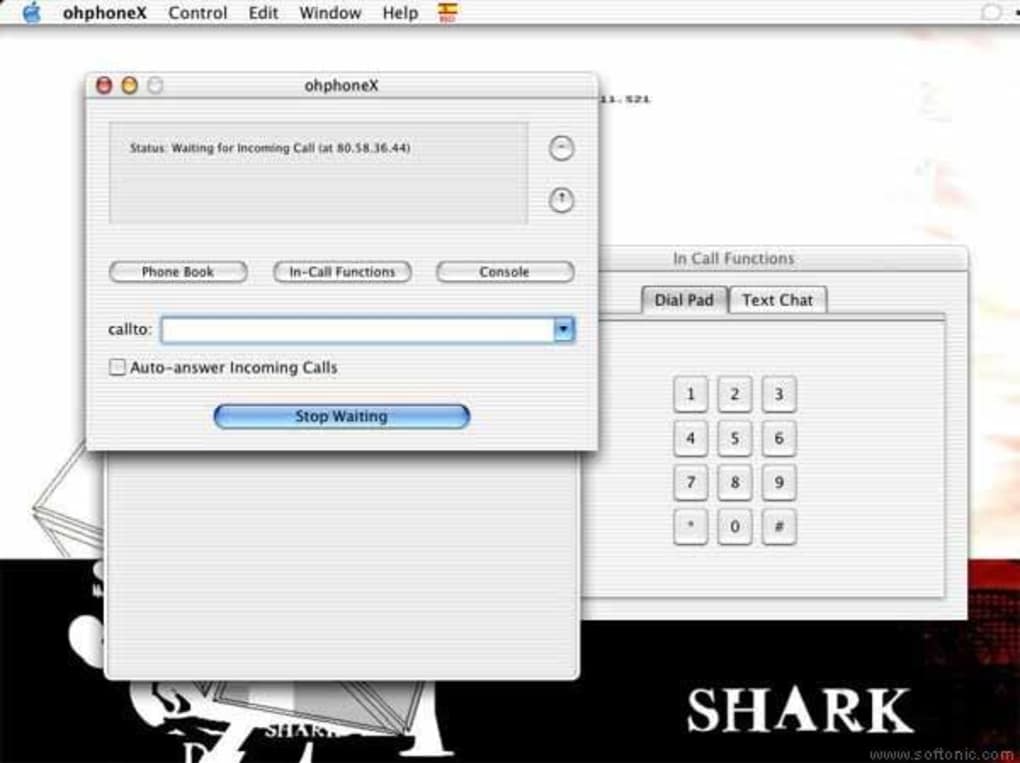
The user interface of ohphoneX is designed with simplicity and functionality in mind. The main dashboard presents essential controls—dial pad, contact list, call history, voicemail inbox, and recording status—within a clean, intuitive layout. Navigation is straightforward, allowing users to initiate calls, access recordings, or manage voicemail with minimal clicks.
Workflow efficiency is enhanced by the app’s integration with desktop environments. Users can answer calls, start recordings, or check voicemail without switching between applications. The interface adapts to both Windows and Mac systems, maintaining consistency in appearance and behavior. However, exact performance details were not specified, and no information was provided about CPU or RAM usage during operation.
Stability observations are based on general software behavior patterns. The application appears to be optimized for continuous use, with no reported crashes or freezes in early deployment. The developer did not specify resource usage details, so users should monitor performance based on their system configuration. Overall, the workflow supports a smooth, distraction-free calling experience.
Compatibility & System Requirements
ohphoneX is available for both Windows and Mac operating systems, making it accessible to a broad user base. The software has a compact installation size of 25.5 MB, indicating a lightweight design that minimizes storage impact. This small footprint suggests efficient code structure and limited background processes.
While the app supports both major desktop platforms, specific version requirements for Windows and Mac were not listed. The developer did not provide detailed hardware specifications, such as minimum processor speed, RAM, or disk space beyond the file size. As a result, exact system requirements were not listed, and users are advised to ensure their systems meet standard desktop application demands.
Compatibility information was partially provided, leaving room for potential issues on older or low-spec machines. Users should verify that their system supports modern desktop applications and that audio input/output devices are properly configured for optimal call quality.
Pros and Cons
Pros
- 100% free with no hidden fees or premium tiers
- AI-powered call transcription for accurate, searchable records
- Secure call handling with privacy-focused design
- Compact size (25.5 MB) for quick installation
- Native desktop experience on Windows and Mac
Cons
- No information on minimum system requirements or hardware specs
- Performance metrics such as CPU or RAM usage were not disclosed
- Limited detail on update frequency or support channels
- No mention of third-party integrations (e.g., CRM, calendar)
- Availability of advanced features beyond core functionality is unclear
FAQ Section
Is ohphoneX compatible with Windows and Mac?
Yes, ohphoneX is available for both Windows and Mac operating systems. Specific version compatibility was not provided by the developer.
Is the software safe to use?
ohphoneX is described as secure, with a focus on protecting user data. The developer emphasizes privacy in the app’s design, though no third-party security audits were mentioned.
How often are updates released?
The release date of version 1.0.0 was April 5, 2024. Information about update frequency or release cycles was not provided.
Does ohphoneX require an internet connection?
Yes, since ohphoneX handles phone calls and cloud-based AI transcription, an active internet connection is required for full functionality.
Can I use ohphoneX offline?
While the app may function in limited capacity without internet, core features such as AI transcription and cloud-based voicemail require an online connection. Offline use is not supported for these functions.
Final Thoughts + CTA
ohphoneX presents a compelling, no-cost solution for desktop-based phone communication. With its AI-powered transcription, call recording, and voicemail features, it fills a growing need for integrated, secure calling tools on personal computers. The app’s lightweight design and cross-platform availability enhance accessibility, making it a strong candidate for remote workers, freelancers, and small teams.
While some details about system requirements, performance, and future updates remain unclear, the core functionality is well-aligned with modern communication needs. For users seeking a reliable, free desktop phone app with advanced features, ohphoneX delivers value from day one.
Download ohphoneX now and experience secure, intelligent calling on your desktop.







